Count site
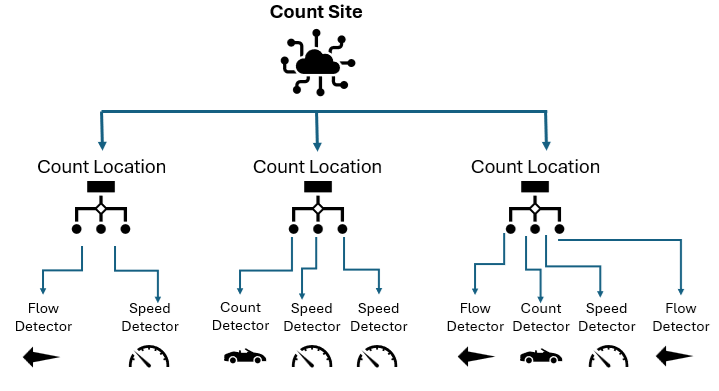
A count site represents a logical object (like an intersection or a parking facility) where speeds, flows, counts, etc. are measured with different technologies (for example, loops and cameras). It is a logical aggregation of many type of hardware devices. In particular, it is composed by one or more count locations.
Count location
Represents a device capable of many type of measurements inside the count site. It is composed by one or more detectors.
Detector
Represents various measurements in the same zone or area. It can record different types of measurements, such as speed, flow, traffic counts, and other traffic-related data, for various types of road users, including bicycles, cars, trucks, and pedestrians.
A detector can also be associated with specific geographic shapes, such as a detection zone or the physical location of a loop detector.
Snapshot
A snapshot is a time-bounded representation of the detector registry state for your product instance. Whenever a user creates, modifies, or deletes an object (or an attribute of an object), the following occurs:
- A “backup” of the current snapshot is created.
- The change is then applied, resulting in a new snapshot.
When you request a snapshot for a FromTime-ToTime window, you get a timeline of the detector registry as it existed during that period.
Two consecutive snapshots will differ depending on the items the user has added, removed, or modified.
The current state is represented in the latest snapshot of the list.
You can filter through a FromTime-ToTime interval, but the larger time range is limited to 1 hour.
Example 1
If I add a count location to a count site, I will have a list with two separate snapshots that differ only in terms of the added count location.
Example 2
Here a fictional but realistic example of a snapshot.
Considering a time window of an hour:
- FromTime = 2026-07-03T08:00:00Z
- ToTime = 2026-07-03T09:00:00Z
Business story:
- At 08:20, one detector was temporarily disabled for maintenance.
- At 08:45, it was re-enabled and its name was updated.
A fictional response (with a simplified JSON format) is shown below:
...
{
 "snapshots": [
   {
     "validFrom": "2026-07-03T08:00:00Z",
     "validTo": "2026-07-03T08:20:00Z",
     "data": {
       "countSites": [
         {
           "code": "SITE-MILAN-01",
           "name": "Milan Central Junction",
           "countLocations": [
             {
               "code": "LOC-NORTH-ENTRANCE",
               "isActive": true,
               "detectors": [
                 { "code": "DET-1001", "name": "Lane 1 Camera", "status": "ACTIVE" },
                 { "code": "DET-1002", "name": "Lane 2 Camera", "status": "ACTIVE" }
               ]
             }
           ]
         }
       ]
     }
   },
   {
     "validFrom": "2026-07-03T08:20:00Z",
     "validTo": "2026-07-03T08:45:00Z",
     "data": {
       "countSites": [
         {
           "code": "SITE-MILAN-01",
           "name": "Milan Central Junction",
           "countLocations": [
             {
               "code": "LOC-NORTH-ENTRANCE",
               "isActive": true,
               "detectors": [
                 { "code": "DET-1001", "name": "Lane 1 Camera", "status": "ACTIVE" },
                 { "code": "DET-1002", "name": "Lane 2 Camera", "status": "INACTIVE" }
               ]
             }
           ]
         }
       ]
     }
   },
   {
     "validFrom": "2026-07-03T08:45:00Z",
     "validTo": null,
     "data": {
       "countSites": [
         {
           "code": "SITE-MILAN-01",
           "name": "Milan Central Junction",
           "countLocations": [
             {
               "code": "LOC-NORTH-ENTRANCE",
               "isActive": true,
               "detectors": [
                 { "code": "DET-1001", "name": "Lane 1 Camera", "status": "ACTIVE" },
                 { "code": "DET-1002", "name": "Lane 2 Camera v2", "status": "ACTIVE" }
               ]
             }
           ]
         }
       ]
     }
   }
 ]
}
...- First block: what was true at the beginning of the window.
- Second block: temporary maintenance phase.
- Third block: current/latest state after the change, still active because validTo is null.
In the example, the specific change, in the third block, is on detector DET-1002:
- Status changes from INACTIVE (second block) to ACTIVE (third block)
- Name changes from Lane 2 Camera to Lane 2 Camera v2
In the third block the maintenance ended, detector came back online, and its label/config name was updated.
Therefore, in the second block we have a device temporarily out for maintenance, while in the third block the maintenance is completed and the device restored.
Measure types
Detectors API handles different types of measure:
- COUNTS: measured in [unit]
- DENSITY: measured in [unit/m]
- FLOW: measured in [vehicles/h]
- OCCUPANCY: measured as a ratio (%)
- SPEED: measured in [km/h]
- TRAVEL TIME: measured in [seconds]
- OTHER: measured in custom unit of measurement
You can get all measure types available for your instance through the endpoint:
GET https://api.ptvgroup.tech/dataprovider/v1/detectors/measure-type
If you want to add a custom measure type to your instance, you can do it through the endpoint:
POST https://api.ptvgroup.tech/dataprovider/v1/detectors/measure-type
For additional details, see Reference API.
Vehicle types
Detectors API handles different types of vehicle:
- MOTORCYCLE
- E-SCOOTER
- SMALL CAR
- CAR
- VAN (SUV/LIGHT GOODS)
- TRUCK (SINGLE UNIT)
- HEAVY TRUCK (SEMI/ARTICULATED)
- PEDESTRIAN
- BIKE
- BUS/COACH
- OTHER or NC (NOT CLASSIFIED)
You can get all vehicle types available for your instance through the endpoint:
GET https://api.ptvgroup.tech/dataprovider/v1/detectors/detected-vehicle-ty…
If you want to add a custom vehicle type to your instance, you can do it through the endpoint:
POST https://api.ptvgroup.tech/dataprovider/v1/detectors/detected-vehicle-ty…
For additional details see, Reference API.